Can I register my holiday?

Why should I report my vacation on SportMember?

- Your coach will be able to see when you are not available


- You won't receive emails and notifications concerning activities on SportMember that are taking place while your away on holiday


- You cannot attend activities on SportMember that are taking place while you are away
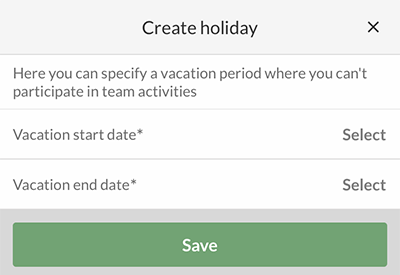
There are two ways of registering your holiday on SportMember


Register through the calendar


Go to Calendar

  1. Press icon in the bottom of the screen
  2. Press Vacation calendar button in the top
  3. Press in the bottom right corner
  4. Type in the start and end date of your holiday and press the green Save button


  • TIP: In the Vacation calendar you can see when your team mates and your coach is on holiday as well. It is also here that you can edit and delete your already inserted holiday if needed.


Register holiday through profile settings


Go to Profile settings

  1. Press the icon in the top right corner
  2. Press to go to PROFILE SETTINGS
  3. Press My vacations
  4. Press in the bottom right corner
  5. Type in the start and end date for your holiday, and end with pressing the green Save button

Go to Calendar

  1. Click on on the left
  2. Click on Calendar on the left
  3. Click on Vacation calendar on the left
  4. Click on the green button Register holiday
  5. Type in the start and end date of your holiday and click on the green Save button


  • TIP: In the Vacation calendar you can see when your team mates and your coach is on holiday as well. It is also here that you can edit and delete your already inserted holiday if needed.
Var denne artikel brugbar?
0 af 2 synes dette var brugbart

Klar til at komme i gang?

Udforsk Holdsport, eller opret en konto med det samme og begynd at administrere din klub. Du kan også kontakte os for at få hjælp til opsætningen af din klub.
Hvad koster det?
Hvilke behov har din klub? Basis eller PRO abonnement?
Priser
Funktionsoversigt
Ingen 2 klubber er ens. Vores funktioner dækker dine behov.
Funktionsoversigt