How do I move/add a member to another team?

Can you be on more than one team?

- There is no limit to the number of teams you can be in. Neither in the club nor on SportMember in general

Neither in terms of roles (member, coach, assistant, etc.)


- As an administrator you can move or add all members/coaches between all teams


- A coach can not move move members
Der findes ikke noget svar på dette spørgsmål, som er relateret til brugen af Holdsport fra appen.

Open Members in the club

  1. Click on Club on the top left
  2. Click on Members

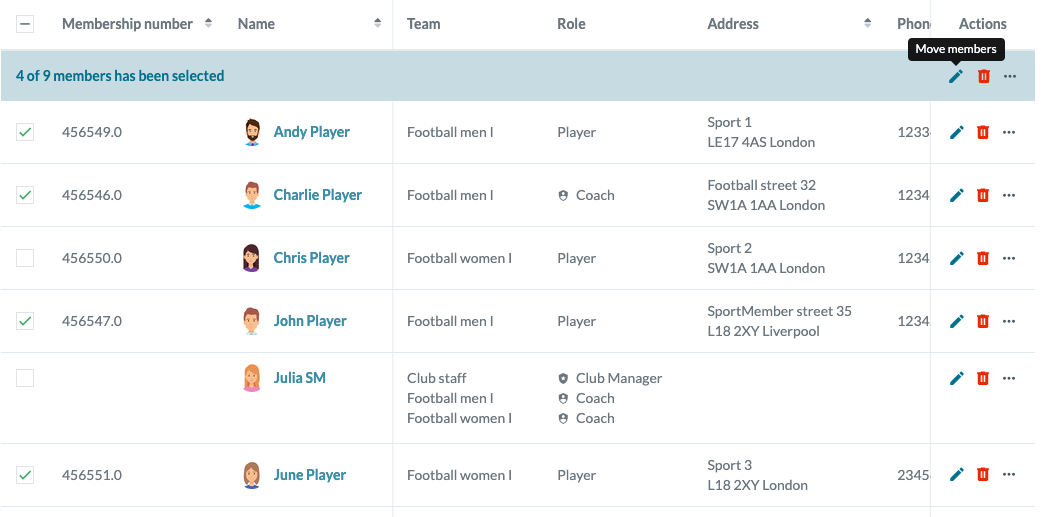
You are now in the club's member list and can choose to move one or more members from one team to another or add to another team, giving the member one more team affiliation.

It is possible to select additional members by clicking in the box to the left of the members in the list. In this way, multiple members can be added to, moved to, or removed from a team (this is explained in more detail below).


Move a member from one team to another

  1. Click on under "Actions" to the right of the members name that you want to move.
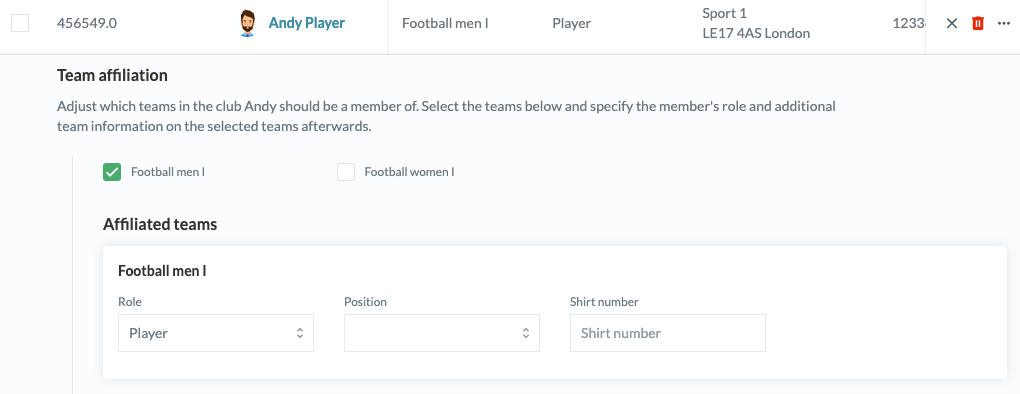
  2. Look for Team affiliation and chose the Team(s) the member should belong to.
  3. In Affiliated teams you can adjust the Role of the member within the team (coach, member, assistant etc.)
  4. Press Save.

Example: A player is assigned to one team. Select or deselect the teams you want by clicking the box next to the teams you want. Press the cross at the top right to cancel.


Move multiple members between teams

  1. First, you select the members to be added, moved, or removed from one or more teams.
  2. Click under "Actions" in the top blue row.
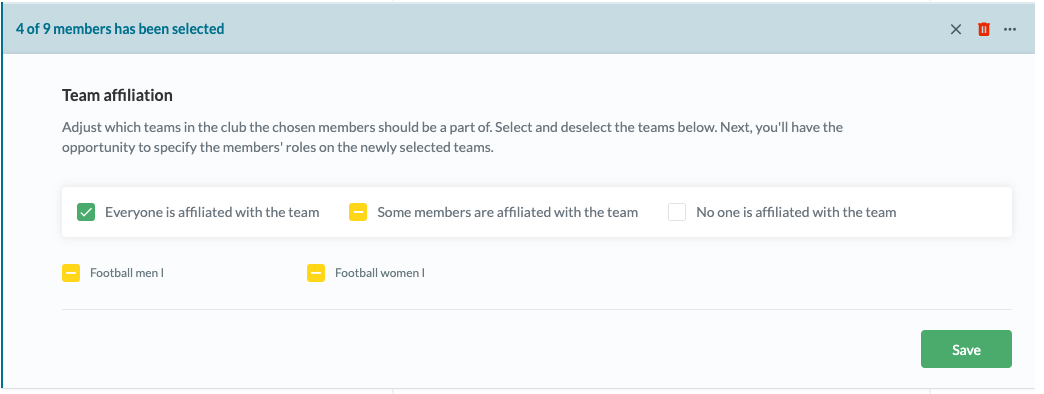
  3. Look for Team affiliation and chose on or more Teams. Please note that this applies to all selected members.
  4. Click Save.

Example: Here you can see the possibilities to add more members. Press the cross in the right corner to cancel.

There are three options for team assignments when moving multiple members. Click several times in the field to add or remove team assignments.

  • TIP: You may want to sort your filter in the member list first so you can move/add/remove an entire team at once. For example, move all members from a U11 team to a U12 team. Here you select the team in the list and then you can check the box to the left of "member no" to select all members of the team.
Var denne artikel brugbar?
2 af 5 synes dette var brugbart

Klar til at komme i gang?

Udforsk Holdsport, eller opret en konto med det samme og begynd at administrere din klub. Du kan også kontakte os for at få hjælp til opsætningen af din klub.
Hvad koster det?
Hvilke behov har din klub? Basis eller PRO abonnement?
Priser
Funktionsoversigt
Ingen 2 klubber er ens. Vores funktioner dækker dine behov.
Funktionsoversigt