Der findes ikke noget svar på dette spørgsmål, som er relateret til brugen af Holdsport fra appen.
Once you have set up your membership fee payment on SportMember, you can see when the first/next payments are due.
Open Membership fees and Future Payments
Click on in the top left corner
Click on Payments
Click on Future payments on the left
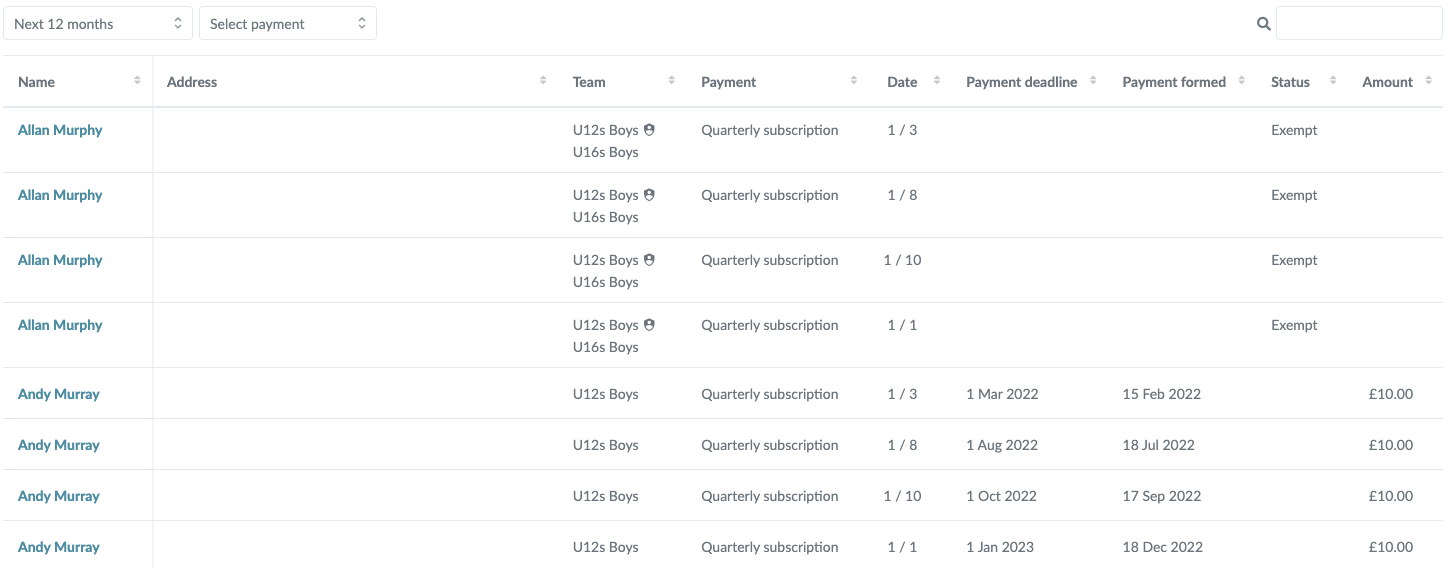
Here you will get a view of members and the charges that are due (and therefore will receive a payment email) in the near future. Keep an eye on the columns:
Name
Address
Team
Payment: Name of the membership fee
Draw date
Payment deadline:
Before new charging period = deadline is your self-selected start date
New member created in the middle of the charging period = mail automatically sent the following night
Payment is made on: (VERY IMPORTANT!)
Status:
Blank: The charge is sent by mail
Exempt: the charge is not sent by email (therefore NOT shown underIndividual payments)
Exempt: the charge is not sent by email. The member's subscription is set to be the club's expense (thus appears in Created payments)
Trial period: the charge will be sent by email later due to the choice of trial period when setting up the subscription
Amount
As soon as we pass the date in Payment formed, and the charge is thus formed and the payment email is automatically sent to the member, the view disappears from Future payments and appears instead inCreated payments.
Udforsk Holdsport, eller opret en konto med det samme og begynd at administrere din klub. Du kan også kontakte os for at få hjælp til opsætningen af din klub.