How do I change the club staff?

What is the club staff?

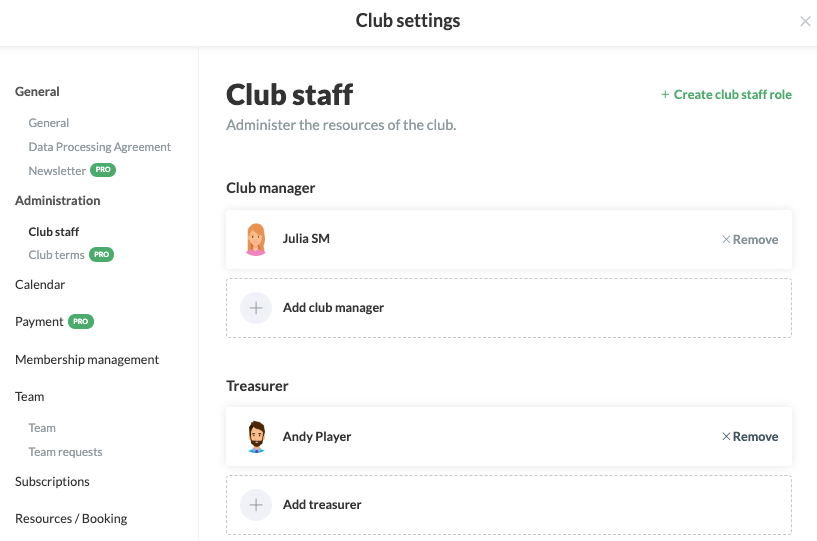
- The club staff on SportMember is a team that is automatically generated as soon as you create the club itself.


- The team contains all club administrators (who have full admin rights) and additionally the webmaster and treasurer (predefined roles)


- You are free to create new roles - e.g. chairman, materials manager, membership coordinator, etc. and assign admin rights to them.


- All coaches/members can view club staff and see who is responsible for the different board positions in the club


- Club staff can NOT be deleted.
Der findes ikke noget svar på dette spørgsmål, som er relateret til brugen af Holdsport fra appen.

In SportMember you will find, as already mentioned, three predefined roles:

  • Club administrator: Has full admin rights in the club.
  • Treasurer: Has access to the payment system only.
  • Webmaster: Has access to the "Web", i.e. the club homepage & the info screen.

Open Club overview and Edit in club staff

  1. Click on Club on the top left
  2. Click on CLUB OVERVIEW
  3. Find the Club staff in the middle of the screen and click on on the right
  4. Click on Edit

You can now choose 4 options:

  • Create club staff role
  • Manage an existing club staff role
  • Edit a club staff role
  • Delete a club taff role

Create a club staff role

  1. Click onCreate club staff role at the top right
  2. Define the name of the new club role and select which rights in the system the role should be granted by ticking them
  3. Finish with Create at the bottom

Manage an existing club staff role

  1. Click on +Add club manager/ +Add treasurer/... at the ottom of the predefined role
  2. Click on Create user and assign role to create a new user in the club. Or click on Assign role to existing user and search for a user already created in the club

Edit a club staff role

  1. Click on Manage to the right of the predefined role
  2. Click on Edit
  3. Change information and finish with Update

    Note that only roles you have created yourself can be edited. The three predefined roles cannot be modified.

Delete a club staff role

  1. Click on Manage to the right of the predefined role
  2. Click on Delete
  3. Exit with Yes

    Note that only roles you have created yourself can be deleted. The three predefined roles are the default.
Var denne artikel brugbar?
1 af 5 synes dette var brugbart

Klar til at komme i gang?

Udforsk Holdsport, eller opret en konto med det samme og begynd at administrere din klub. Du kan også kontakte os for at få hjælp til opsætningen af din klub.
Hvad koster det?
Hvilke behov har din klub? Basis eller PRO abonnement?
Priser
Funktionsoversigt
Ingen 2 klubber er ens. Vores funktioner dækker dine behov.
Funktionsoversigt